---
title: The employee lifecycle
description: This article describes the Employee Lifecycle, which allows you to track an employee’s full history of performance survey participation. You’ll learn how the section works, what types of surveys are included, and how to view and understand the different participation and results indicators.
---
[Skip to content](https://support.atwork.ai/the-employee-lifecycle#main-content)
- [English](https://support.atwork.ai/the-employee-lifecycle)
- [Deutsch](https://support.atwork.ai/de/the-employee-lifecycle)
English
Show submenu for translations
![logo-blue\_small.png\]](https://support.atwork.ai/hs-fs/hubfs/logo-blue_small.png?height=40&name=logo-blue_small.png)
Open main navigation
Close main navigation
- - [English](https://support.atwork.ai/the-employee-lifecycle)
- [Deutsch](https://support.atwork.ai/de/the-employee-lifecycle)
English
Show submenu for translations
- [Go to atwork.ai](https://atwork.ai/)
[Go to atwork.ai](https://atwork.ai/?hsLang=en)
Hello. How can we help you?
- There are no suggestions because the search field is empty.
1. [Help Center](https://support.atwork.ai/?hsLang=en)
2. [Performance & 360°](https://support.atwork.ai/performance-360?hsLang=en)
3. [Performance Dashboard](https://support.atwork.ai/performance-360?hsLang=en#performance-dashboard)
# The employee lifecycle
## This article describes the Employee Lifecycle, which allows you to track an employee’s full history of performance survey participation. You’ll learn how the section works, what types of surveys are included, and how to view and understand the different participation and results indicators.
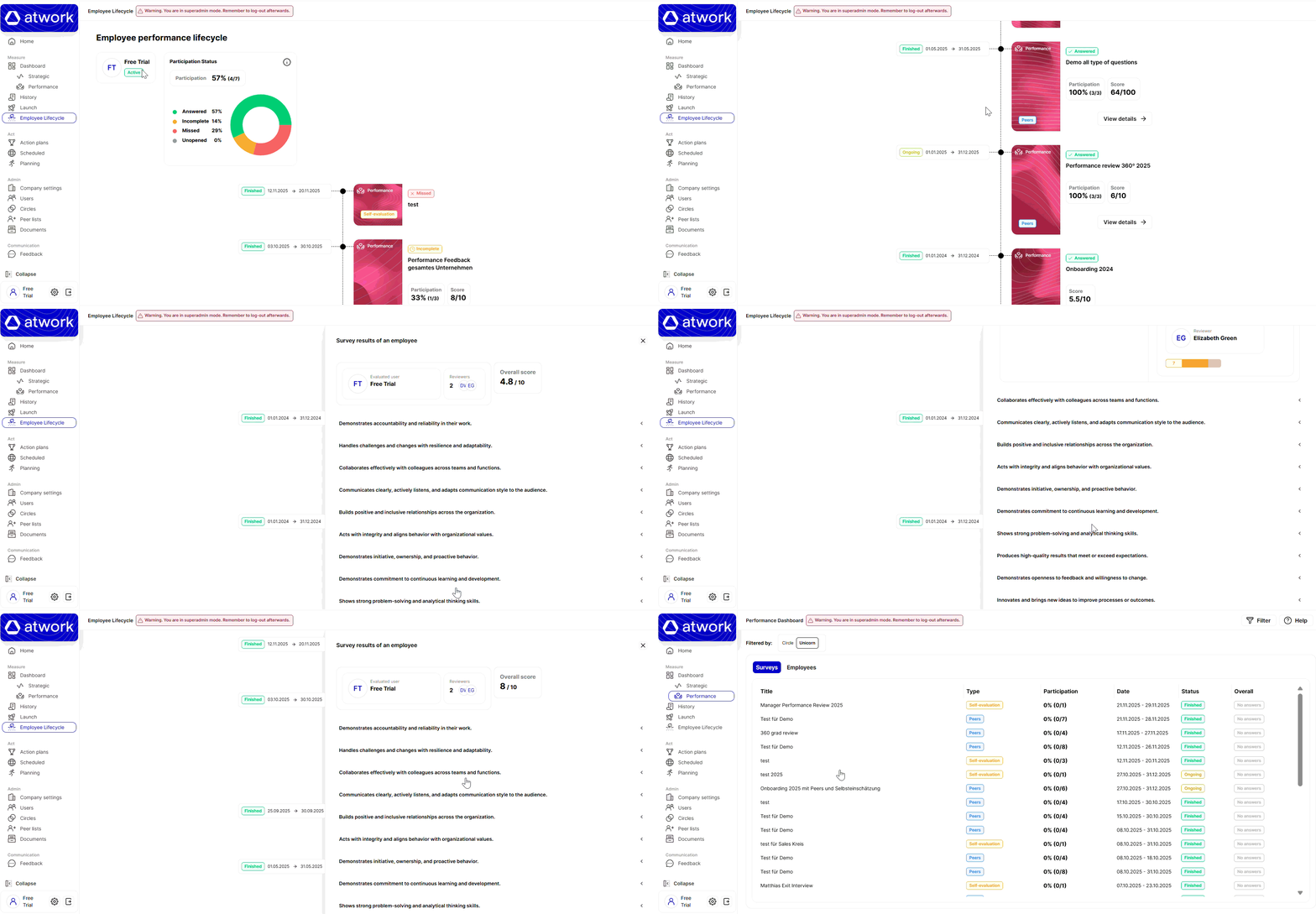
#### The Employee Lifecycle section provides a complete overview of all performance surveys an employee has participated in—either as a self-evaluator (self-evaluation surveys) or as the evaluated user in peer surveys. Only performance surveys appear in this section. Custom surveys and strategic surveys are excluded. Furthermore, if the employee participated only as a reviewer, those surveys will also not be shown.
### **Access & Permissions**
#### **Your own lifecycle**
You can view your own lifecycle by navigating to **Employee Lifecycle** in the main menu.
This feature can be enabled or disabled by a superadmin via the **EMPLOYEE\_LIFECYCLE** setting.
#### **Another employee's lifecycle**
To view someone else’s lifecycle, you need access to the **Performance Dashboard**.
Within the dashboard, open the **Employees** tab to see the list of employees you are allowed to access.
### **1. Summary**
This section displays:
- The employee’s **name**
- The employee’s **status** (active or disabled)
- A **participation status graph** showing the distribution of all surveys the employee has been involved in—either as self-evaluator or evaluated user
#### **Participation Calculation**
- Participation = **number of answered surveys / total surveys**
#### **Participation Status Definitions**
| Status | Description |
| --- | --- |
| **answered** | Surveys fully completed and submitted |
| **incomplete** | Surveys started but not finished |
| **missed** | Finished surveys without any response (survey status = *finished*) |
| **unopened** | Open surveys that have not been started (survey status = *ongoing*) |
| **reviewer-only** | Surveys where the employee is not a participant and only reviewers take part |
#### **2. Survey List**
This section shows all performance surveys the employee has been part of, sorted by **start date** from oldest to newest.
> **Note:** Scheduled (future) surveys are not shown.
Each survey card includes:
- Survey **status** (finished or ongoing)
- **Start and end date**
- **Launch type** (peer or self-evaluation)
- **Participation status** (answered, incomplete, missed, unopened, reviewer-only)
- **Survey title**
- **Participation rate** (peer surveys only)
- **Score** (only if rating questions received responses)
### **“View Details” Button: When It Appears**
The button is displayed based on survey type and participation conditions.
#### **Self-evaluation surveys**
- Visible when the user has started **or** submitted the survey, regardless of survey status.
#### **Peer surveys (evaluated user NOT included)**
- Visible when at least **one reviewer** has started or submitted the survey.
#### **Peer surveys (evaluated user included)**
**If you are viewing your own lifecycle:**
- Shown if the survey is ongoing **and** the evaluated user has submitted
- Shown if the survey is finished **and** there are responses
**If you are viewing another employee’s lifecycle:**
- Shown whenever the survey has results (no need for the evaluated user to have answered)
- [Getting started with atwork](https://support.atwork.ai/getting-started-with-atwork?hsLang=en)
- [General](https://support.atwork.ai/general?hsLang=en)
- [Set up your platform](https://support.atwork.ai/set-up-your-platform?hsLang=en#main-content)
- [Company Settings](https://support.atwork.ai/set-up-your-platform?hsLang=en#company-settings)
- [Circles](https://support.atwork.ai/set-up-your-platform?hsLang=en#circles)
- [Users](https://support.atwork.ai/set-up-your-platform?hsLang=en#users)
- [Create & launch surveys](https://support.atwork.ai/create-launch-surveys?hsLang=en#main-content)
- [Strategic Survey](https://support.atwork.ai/create-launch-surveys?hsLang=en#strategic-survey)
- [Custom Survey](https://support.atwork.ai/create-launch-surveys?hsLang=en#custom-survey)
- [Dashboard](https://support.atwork.ai/dashboard?hsLang=en)
- [History](https://support.atwork.ai/history?hsLang=en)
- [Activity Module](https://support.atwork.ai/activity-module?hsLang=en)
- [Performance & 360°](https://support.atwork.ai/performance-360?hsLang=en#main-content)
- [Create & Manage Performance-Surveys](https://support.atwork.ai/performance-360?hsLang=en#create-manage-performance-surveys)
- [Performance Dashboard](https://support.atwork.ai/performance-360?hsLang=en#performance-dashboard)
- [Launch of Performance Surveys](https://support.atwork.ai/performance-360?hsLang=en#launch-of-performance-surveys)
- [FAQ](https://support.atwork.ai/performance-360?hsLang=en#faq)
- [Survey Catalogue](https://support.atwork.ai/survey-catalogue?hsLang=en#main-content)
- [Performance Module](https://support.atwork.ai/survey-catalogue?hsLang=en#performance-module)
- [FAQ, security & legal](https://support.atwork.ai/faq-security-legal?hsLang=en)
[](https://atwork.ai/?hsLang=en)
[Onboarding-Portal](https://welcome.atwork.ai/atwork-customer-onboarding)
[Trust Center](https://support.atwork.ai/en/trust-center?hsLang=en)
[support@atwork.ai](mailto:support@atwork.ai)
Copyright © 2026, atwork.ai